A field guide to circular design using AI
CISCA
Circular Innovation & Sustainability Creative Assistant. AI won’t design for you. But it can help in making your ideas more circular, more feasible, and more relevant.
Circular Innovation & Sustainability Creative Assistant. AI won’t design for you. But it can help in making your ideas more circular, more feasible, and more relevant.
Not more things with better excuses.
AI only gets useful when the brief gets sharper.
From linear waste to circular logic that works.
That's what defines us as animals and sets us apart. We make things. We shape our environment. We actively engage with it to suit us better. We always have.
And then there's design. The process behind the making. If you're lucky and got to take some time to sit down with that process — through education or practice, and probably both — you start to understand what a superpower it really is.
You stop simply making stuff and you start understanding what making is actually about. You realise that every object, every system, every interface, every service exists because someone decided that it should (or at least could) exist. Someone chose its shape, its logic, its assumptions. Someone designed it.
And when you really get that. When design stops being a concept and becomes something you feel, everything looks different. The chair you're sitting on. The streets outside. The way your phone makes you feel at 11pm. None of it just happened. It's all design.
Design is a superpower. Not that designers are special. But design — the act of deciding what exists and how it works — is one of the most powerful things a human being can do. You're not just making things. You're making the worlds other people get to live in. You're shaping what they think is possible. How they perceive reality.
But as Uncle Ben once told Peter Parker: "With great power comes great responsibility."
Because if everything's designed, and if design is everywhere, then we have to admit our responsibility as designers in the big global challenges we're facing. Energy crisis, resource depletion, carbon emissions, platforms built around guilt-tripping our children into conformity. We made those. We chose they had a place in our world. And still, almost every design expo keeps focusing on furniture.
We think it's time to grow beyond that. We solved the problem of sitting a long time ago.
Don't get us wrong — it doesn't mean you can't design chairs anymore. But it does mean that every designer has the choice about where they aim their creative power. And right now, there are more urgent challenges to focus on than the same products but slightly different.
We used to talk about the built environment versus the natural environment. What we made versus what is part of the natural world. That distinction is gone. If you can find plastics in the deepest ocean trenches, if our behaviour is reshaping weather patterns, if our soil is fully depleted and biodiversity is on the brink of collapse, there is no more natural world. It's all built environment.
And the question is not whose fault that is or how messed up the situation is exactly. The question is what we will do about it. If it can be broken, then it can be fixed. If this was designed, then it can be redesigned. There's a difference between guilt and responsibility.
The circular economy is in its essence a design problem. Not a policy problem, not a technology problem — those are all levers that can accelerate and amplify what we make. But first we have to start making it. And not just in prototypes, pilot projects and test-cases. Every designer holds the responsibility to make better things in order to make things better. It's a question of what we make, why we make it, how we make it, and what happens to it afterwards. Those are design questions. We know how to deal with those.
And that's why we decided to use AI as a tool to take on that challenge. This guide is our attempt to make that easier to act on. We're sharing all our prompts, design flows, tools and learnings in the hope of radically democratizing and deskilling circular design. This should not be a field only inhabited by a few experts. We don't need to turn every designer into a circular economy theorist.
We need you all to start designing circularly, by doing what you already know: designing. We hope this guide can give you a tool, a process, and enough background to get busy with it immediately. To start and to keep going.
We're not going to spend pages explaining why we need a circular economy. That case has been made over and over again by people smarter than us. What we want to talk about is circular design. And more specifically why circular design is hard. Because it is. There are three challenges to it.
For a long time, designers were called in at the end of the process. The strategy was set, the business model was decided, the brief was written, and then someone said: "now make it look good." Design as decoration. Design as the last step before production.
That's changing, slowly. But in most organisations, design is still treated as a phase in the process, not as an overarching way of looking at things. Circular design requires designers to be in those rooms. And to have something to say once they're there.
Design school teaches you mostly to prototype physical things. And for good reason. But with circular design, you really have to look at business model design, service design, systems design. It fundamentally shapes the design brief and outcome.
A business model prototype is a conversation, a financial sketch, a role-play with a potential partner. These are learnable skills. But they're new terrain for a lot of designers, and that unfamiliarity is enough to make people hesitate.
Circular economy is a systemic challenge. It's complex in a way that touches upon pretty much everything. Understanding which decisions trigger which effects, how feedback loops work, where the leverage points are — that's hard for everyone.
But here's the thing: pick up almost any book on systems dynamics and at some point you'll notice that, underneath the new terminology, the same pattern keeps appearing: these researchers have just stumbled upon design without knowing it.
The reason is simple. Design is fundamentally about unknown unknowns. About when you don't know what you don't know yet. By making new things, we often discover things we didn't know yet. We learn by doing. We prototype our way to understanding.
This means that the skill we need most right now, in this transition, is not more research or better frameworks. It's the ability to act under uncertainty, to make something, see what happens, observe and adjust. To design our way forward.
And we, designers, already know how to do that. We just might not have aimed it at this yet.
In the summer of 2023, Jan and Manu started testing with AI, and figured out quickly: "Hey, this thing can do what we do!" So they started pushing to see whether you could use large language models to automate parts of strategic circular design — business models, ideation, concept development. Not as a gimmick, but as a genuine attempt to see if AI could do some of the heavy lifting on the parts that typically require years of background knowledge to do well.
The answer quickly proved to be yes.
Around the same time, Thomas was exploring how AI visualization tools could help designers explore shapes, aesthetics, design briefs, and materiality faster. He wrote a practical guide on it for his students at Howest. We looked at that guide and thought: we need something like that for circular economy.
At the end of 2024, Circular Flanders put out a call for Design4Circularity projects. We applied with a simple idea: write an open source guide that democratizes circular design practice. Make it practical enough that any designer can pick it up and use it immediately.
What followed was about eighteen months of building, breaking, and rebuilding. Every time we figured out a way to make something work, the technology moved — and pushed us to move the ambition as well.
Our first versions were built around large reference databases. We assembled everything we knew about circular design methodology into structured knowledge documents, and used those to ground the AI's responses. Then GPT-4 got updated, and suddenly all that carefully assembled knowledge was already baked into the model. The reference database approach became redundant overnight.
So we shifted. Different tools for different steps. That worked well, until the models got good enough at visual generation that our whole tool stack collapsed from three or four separate tools into one. Which required rebuilding again.
And then we realized something uncomfortable: we were completely locked into one company's ecosystem. One pricing decision, one policy change, and the tool we'd spent months building could become inaccessible or irrelevant. That wasn't good enough.
So we redesigned the whole thing with model independence as a hard requirement. Instead of building for one platform, we built in layers.
These three files work on any capable language model. They're in plain text. You can read them in full, update them, change them, turn them into exactly what you need. They're yours.
We started this entire project with the ambition to openly share everything we make.
We're building this on public knowledge. We're funded by public money. Turning that into a paywall is the level of cynical we refuse to get to.
Automation is always about deskilling. That was true of the industrial revolution. True of the first assembly lines. And it will be the case for AI as well. AI drastically removes the need for expertise and makes specific knowledge jobs a commodity.
But for us, when looking at circular economy, deskilling isn't a threat. It's the point. You don't need to be an expert to use a calculator. You shouldn't need to be a circular economy expert to design circularly.
CISCA is not meant to hide the thinking behind a shiny render. Its visual language is deliberately sketch-like: concept, loop, mechanism, material logic, user context. Enough to discuss. Not so polished that it pretends the hard questions are solved.
There is one thing we have to be aware of when talking about sustainability and AI: AI has an energy and water footprint. Training a large language model like GPT-3 used an estimated 936 MWh of electricity and produced around 600,000 kg of CO2. That's before a single person used it to design anything.
Every time you run a prompt, that costs energy too. A simple prompt on a smaller model uses roughly the same energy as a Google search. A complex prompt on a large model can use as much as charging your phone. Generating an HD image costs about the same as that phone charge.
Using AI to turn your colleagues into Studio Ghibli characters is a choice. Using it to redesign broken systems is also a choice. We're not here to tell you what to do with your energy budget. But we do think it's worth being conscious about it. Use the tool with intention.
Every design process has a flow. A way of moving from vague to focused, from problem to proposal, from "we should probably do something about this" to something you can actually put in front of a client.
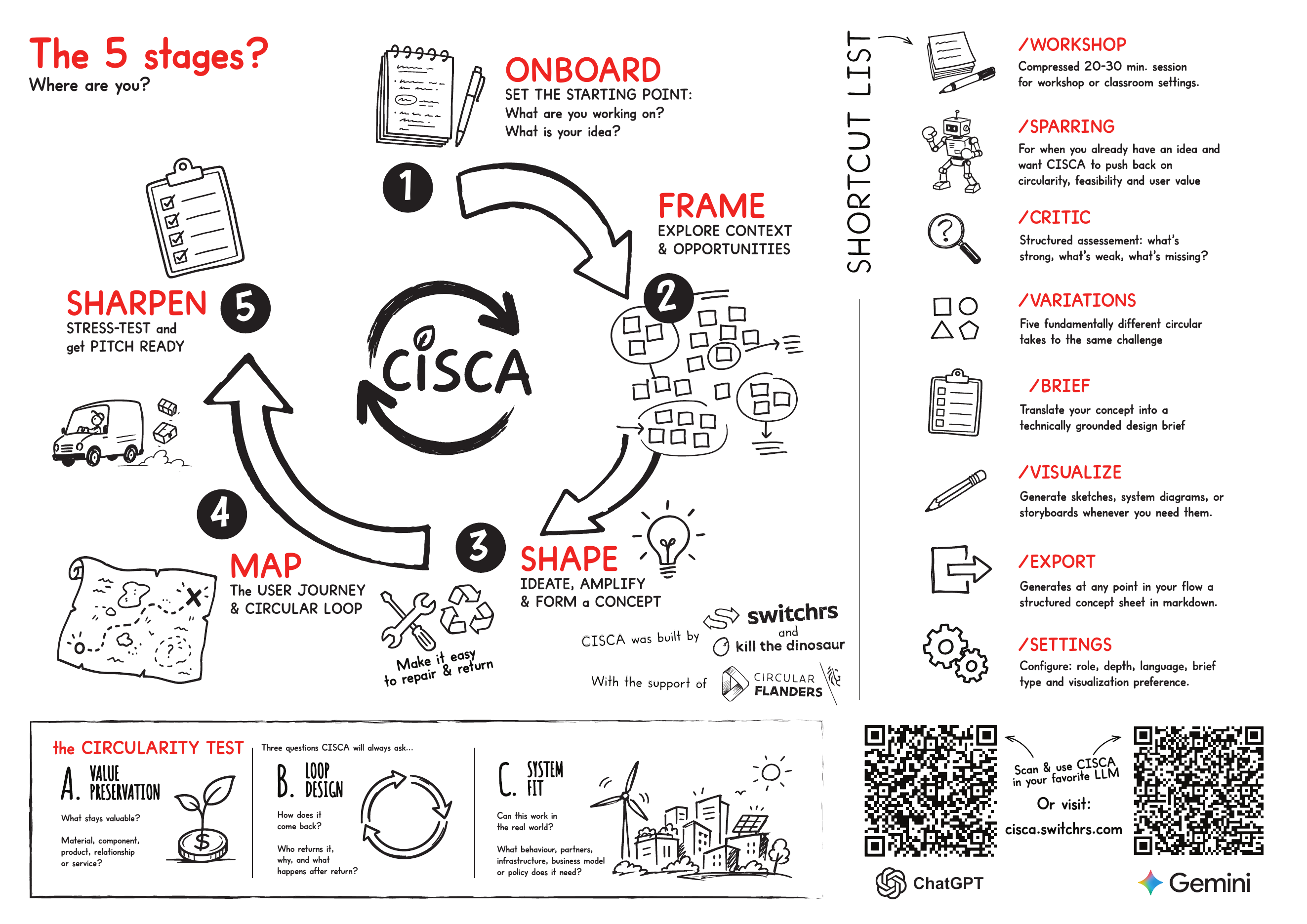
We called our tool CISCA — Circular Innovation & Sustainability Creative Assistant — and it follows a flow with five phases. These are not five rigid gates with deliverables and sign-offs, but rather five different mindsets you move through during a circular design process.
Like in any good design process, the tool shifts how it works inside each phase: from the questions it asks, over the frameworks it draws on, to the way it keeps pushing your thinking toward circular logic without taking the wheel from you.
This is where you set the scene. You tell the tool who you are and what you're working on. Are you a student exploring a brief for the first time? A professional designer with a client ask that's been sitting on your desk for weeks? A facilitator running a workshop with twenty people in two hours?
The tool listens and calibrates. It won't give a student the same experience as a senior designer, and it won't approach an open exploration the same way it approaches a specific client brief. It asks one question at a time, builds a picture, and confirms what it understood before moving on.
Nothing gets generated in this phase. That's intentional. The tool's job here is to understand before it does anything.
One of the most crucial parts of any design challenge is finding the actual challenge and framing it. If your client knew what they needed, they wouldn't have called in a designer.
In circular design this is no different, but it might require you to read in a bit more in the global context. What's actually shifting in this sector? What regulation is coming that the client hasn't factored in yet? What's the tension underneath the stated problem that nobody's talking about?
This is really where technology like AI, and by extension this tool, earns its keep. It scans for relevant context, surfaces pressures and opportunities in the client's world, and helps you find the real design ambition.
This is the heart of design. Moving from challenge to concept. And the most important thing to understand about this phase is what our tool will not do.
It will not generate a circular concept for you. This isn't a design automation tool, it's a facilitation tool. It takes your rough ideas, your hunches, your half-formed directions, and pushes them through three filters: is value actually being preserved here? Is there a real loop? Does this actually work in the real world?
The concept that comes out of this phase is still yours. The tool makes it sharper. That's the deal.
Once you have a concept direction, it's time to make it tangible. Phase 4 runs two paths in parallel.
Once the concept is formed, you stress-test it.
We made design sparring partners, not an automation tool. So we use sketches to communicate the concept, the flow, the business model.
/brief to develop a technically grounded product design brief: architecture, materials, manufacturing, disassembly strategy.The tool responds to slash commands. You don't need to learn them by heart — ask "What modes do you have?" at any point. Click to expand each one.
Enough talking about what we tried to make. Below is a step-by-step run through the full design flow. From a vague design brief to a clear concept. Please don't read this part as an info-brochure. Try it out. Test it. Play around with it. And let us know what you think.
Follow one of the links at the bottom of this page, and start a conversation. Don't overthink the opening message. You don't need a perfect brief. You don't need to introduce yourself formally. Just tell it what you're working on.
Something like "I'm a product designer working with a clothing brand that wants to do something circular. Not sure where to start." is enough to get going — the tool will take it from there.
CISCA workshop posterThe tool won't immediately launch into advice or frameworks. It'll ask you one question at a time to understand the situation better. Who are you? What's the brief? Do you already have ideas, or are you starting from scratch?
You don't have to overthink your answers — they can be scattered all over the place, feel free to add open-ended thoughts, rough sketches. The more specific you are, the more useful it gets. "A mid-size Belgian clothing brand, about 80% of their product is basics, they manufacture in Portugal, they want to launch something circular next year but don't know what" probably works better than "a fashion brand."
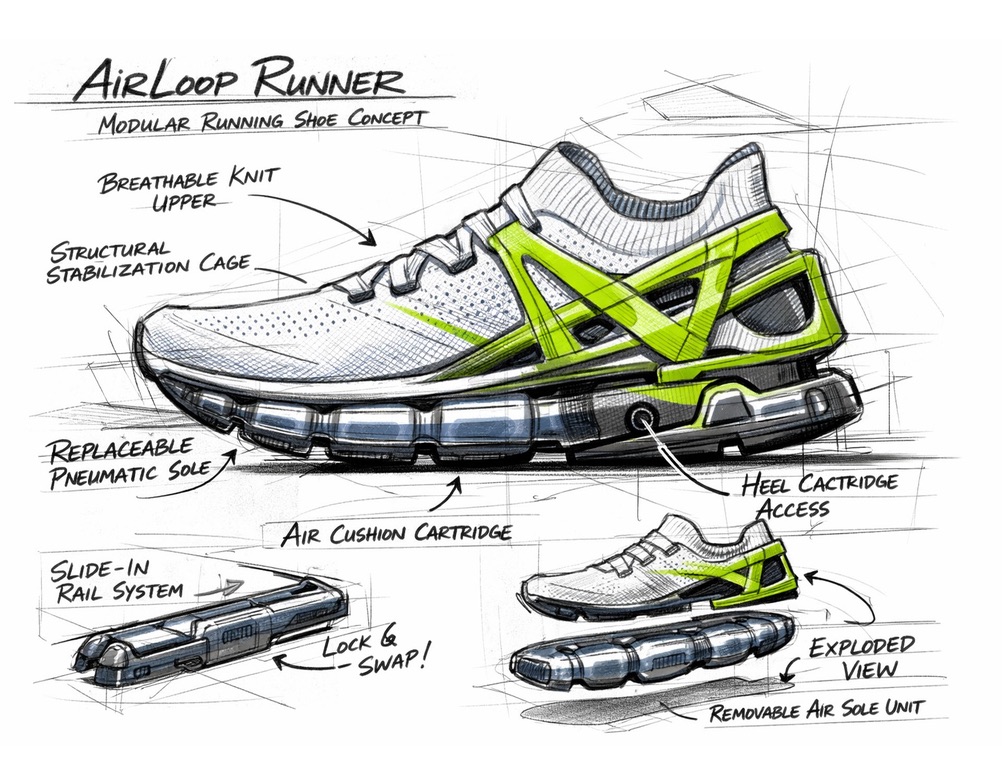 Concept sketch — modular running shoe
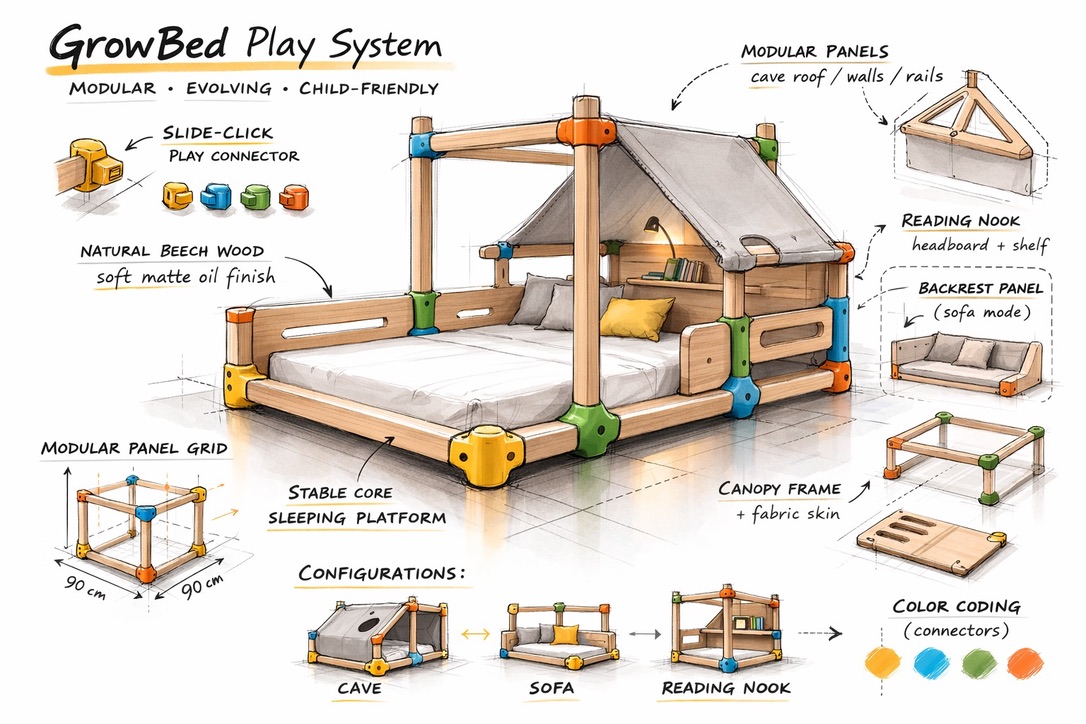 Concept sketch — modular bed system
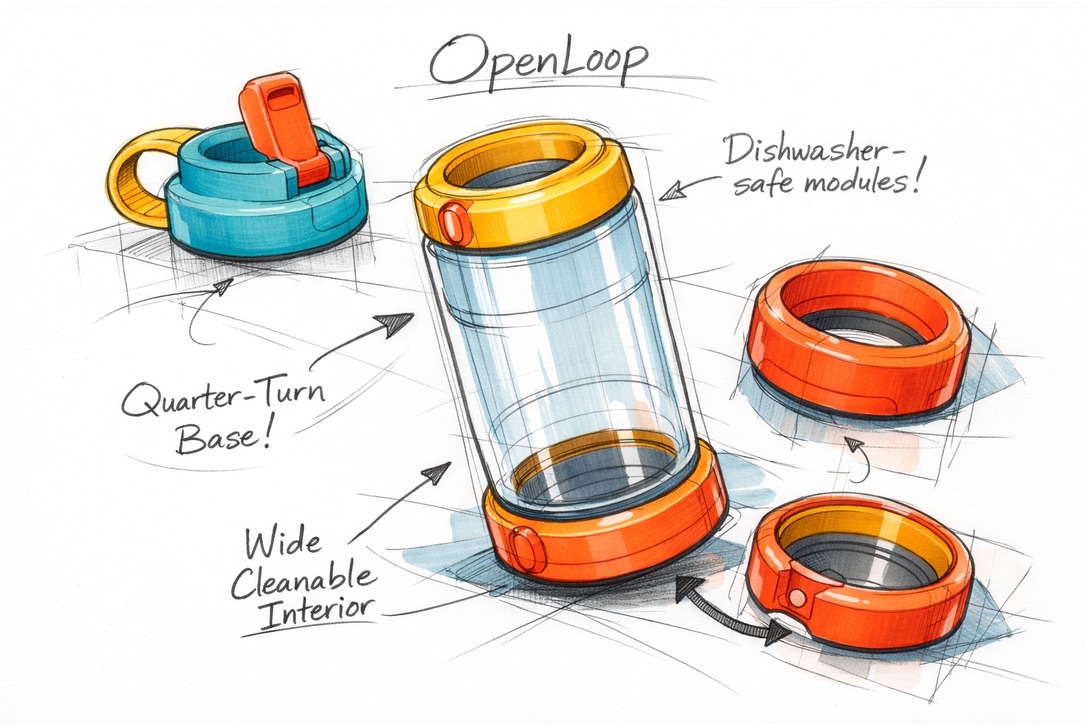 System sketch — open-loop food container
Once the tool has a picture of your situation, it moves into framing. It will try to look at what's shifting in the sector: regulation, material pressures, market opportunities, changing user behaviour. This helps it — and hopefully you — find the tension underneath the initial design challenge.
Important: LLMs are still a relatively new technology, and they tend to lie very convincingly. Make sure you double check, keep your own opinions and share them. It's not the tool's job to take over the wheel, it's your job to find a red thread, give it direction, and ultimately decide on what's relevant.
You'll end this phase with an ambition statement. One sentence. It'll feel simple, but it does a lot of work. Everything that follows is in service of it.
This is a step we were really nervous about when building. Because we don't want a design automation tool. We want a clever side-kick that can help you keep track of the complexity of circularity, and who thinks with you, not for you.
You don't need to have a solid idea or concept in your head yet. What you need, as a designer, is an opinion. A direction, a hunch, something half-formed the tool can react to or build upon.
The tool takes whatever you bring and starts pushing it through the three filters: value preservation, loop design, system fit. It asks one question at a time. You answer. The concept gets sharper. Don't wait to have the perfect idea before you start typing. Start typing and let the concept develop in the conversation.
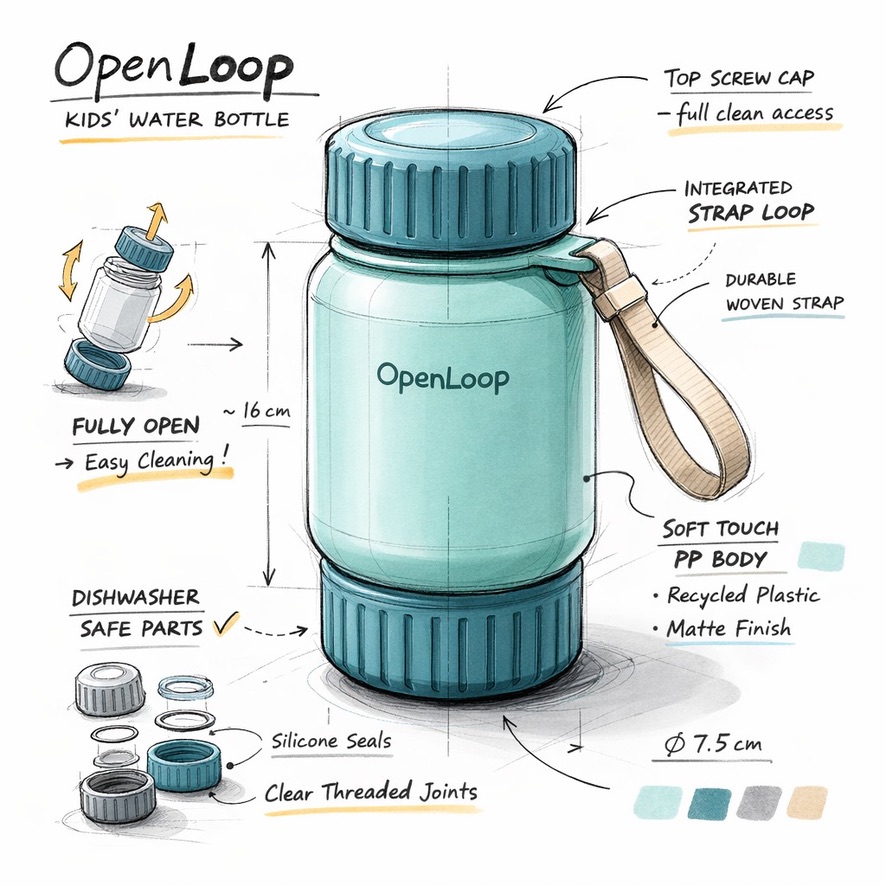 Product brief — open-loop kids bottle
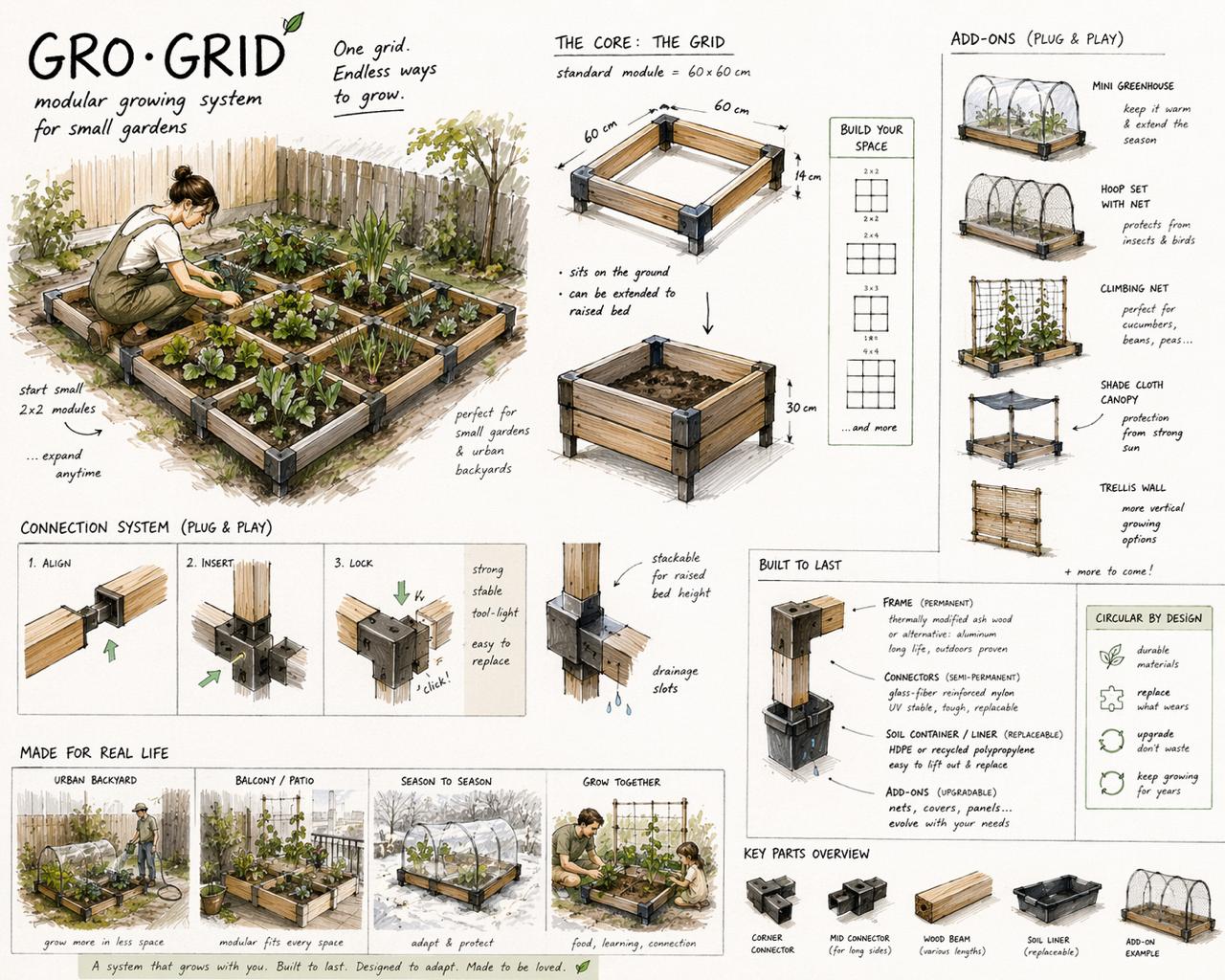 System board — modular growing grid
Once the concept is clear enough, the tool walks you through two journeys: what the customer experiences, and what happens to the materials. One stage at a time.
If you get stuck on a stage, the tool will offer a suggestion based on what you've built so far. You can edit, push back, or just say "yes, that's right." The goal is to get both journeys mapped cleanly, and then to zoom in on one specific loop — the mechanism that actually closes the circle.
By the end of this phase, your concept isn't just an idea anymore. It has a clear idea on how it works on a systems level.
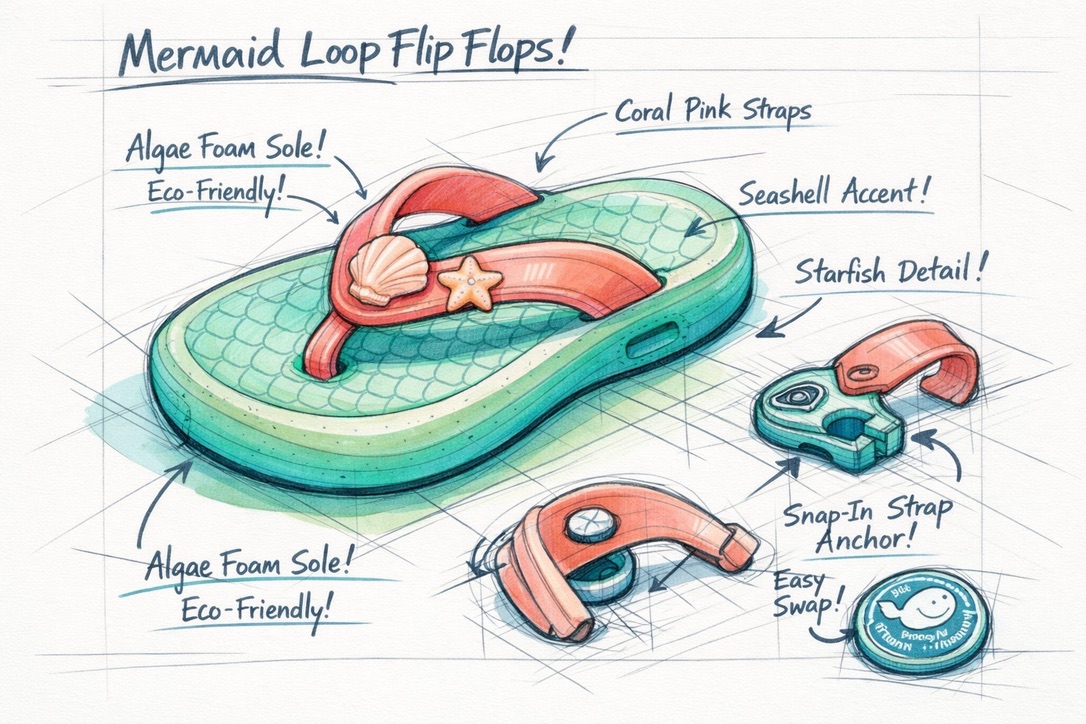 Concept sketch — modular flip flops
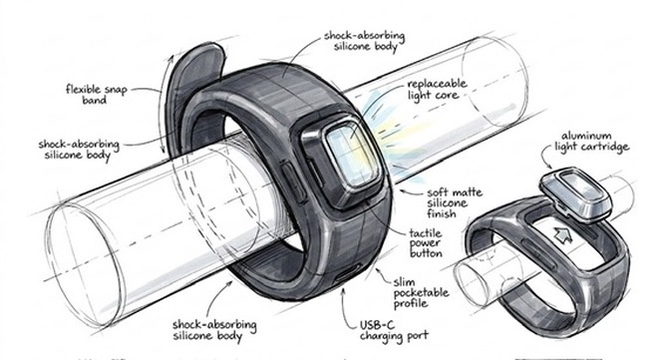 Component sketch — repairable light band
Almost there. The tool will ask you three stress-test questions: Who are your partners? Where are your assumptions? Can you state the circularity, the business model, and the user value each in one sentence?
In this step you can also deepen the concept further and build a more in-depth design brief: materials, user context, manufacturing logic, CMF.
This is also a good place to play around with visualizations. The sketch won't be a finished design — it's not supposed to be — but it will give you a way to make it more tangible, to see the concept in its first materialized version.
If you type /export, you'll get a structured concept sheet in markdown. Copy it, paste it into your own document, share it with your client or your team.
If you think this workflow was cool (or utter crap), let us know. We're always looking for ways to improve.
Concept visualization — exploded product logicConcept visualization — loop mechanismExport — CISCA workshop posterCongratulations — you just went through your first full flow using the circular design partner. From a vague brief to a concept sheet, in one conversation.
The best way to understand what this tool can and can't do is to use it on something real. Not a made-up exercise. An actual brief, an actual challenge, something you actually care about. That's when the useful friction shows up.
And the more you use it, the more you get a feel for when (and when not) to make it part of your design routine. Go try it. Come back and tell us what you made.
All designers need to grow a bigger awareness of the impact their choices and designs have on our world. This means we need better tools for designers, but also find ways for the next generation of designers to get active with this more systemic way of designing.
That is why we stress-tested our tool a lot on students. This section is written for the people who put designers and students in a room and point them at a challenge.
The short version: you don't need to be a circular economy expert to facilitate this.
The fastest way to run a session is to have students open the tool and type /workshop. This puts the tool into a compressed mode designed specifically for group settings: lighter on research, heavier on brainstorming, and structured to get from brief to concept sheet in roughly 30 minutes of tool interaction.
That 30 minutes is the conversation with the tool. Build the rest of your session around it. A format that worked well for us:
The first was an open brief. Students could choose from a set of design challenges (we used: a children's bed, a children's clothing concept, a sneaker, or a version of the Decathlon 2-second tent). The variety of outputs from the same brief was one of the most interesting parts to discuss afterwards: same challenge, completely different circular logics.
The second format was for students who were already deep in a circular design project. Instead of the full /workshop flow, we ran a session focused on two specific modes: /variations to push their existing concept in new directions, and /critic to stress-test what they had. This works particularly well mid-semester when students have something formed but not yet resolved.
Workshop output — family of product variantsWorkshop output — material-led conceptWorkshop output — system-level conceptThe tool works best when students come in with something to react to. Even a half-formed opinion is enough. The sessions that struggled were the ones where students waited for the tool to tell them what to think. Remind them before they start: the tool asks questions, it doesn't answer them.
Also, LLMs can be very convincing, even when wrong. That's why we ask every student to quickly fact-check at least one insight they feel uncertain about. Media and data literacy are a good habit to build.
The reflection part at the end of the workshop matters as much (if not more) as the tool interaction. Some of the best learning in our sessions came from students comparing their outputs and asking "why did ours go in such a different direction?" That's a circular design conversation, and it's one the tool can't have for them.
Our tool is completely open source and you'll find every single prompt and instruction fully documented below. If you want to adapt the prompts for a specific course, a specific sector, or a specific level of student, everything you need is there. You can run it on ChatGPT, Claude, or whatever platform your institution uses. If you do adapt it and find something that works well, we'd really like to know.
We built this tool on public knowledge, funded by public money, shaped by a community of practitioners, researchers, and educators who've been developing circular design thinking for decades. Keeping it behind a login or an invoice would be absurd. So we didn't.
Everything is open: the prompts, the frameworks, the logic behind the tool. You can read it, copy it, run it on whatever model you prefer, adapt it for your context, or build something completely different on top of it.
Three silent filters applied to every concept. If CISCA can't answer all three, the concept isn't fully circular yet.
What stays at its highest useful value for the longest time?
What is the actual mechanism that makes things come back?
Does this actually work in the real world?
10 strategies ordered from highest to lowest value preservation. Always push as high as feasible. Click a rung.
Make the product unnecessary — dematerialise, prevent the need entirely. The highest form of circular design: not creating the problem in the first place.
Use as creative triggers — pick 3–5 from different categories. Power comes from unexpected combinations.
Everything CISCA knows and does is in these three files. Copy them, download them, run them on whatever model you prefer. No login, no paywall.
Loading…
Loading…
Loading…
v0.3.1 · May 2026 · CC — copy freely, attribute if you can, improve always.



To Vlaanderen Circulair — this project was made possible by their support in the Design4Circularity call. We're very grateful for the opportunity, and for the work they do every day to push the circular economy forward in Flanders and beyond.

To all creative activists out there. This guide is dedicated to everyone who decided that things could be different. The activists, the entrepreneurs, the researchers, the teachers, the students, the citizens, and the designers who are quietly and loudly redesigning the world from the inside out. The people who get laughed at in meetings for asking the uncomfortable questions, and who go home and keep working anyway.
Whether you're doing it alone or found your tribe, whether it feels like you're actually pushing the needle or you're stuck in simply trying to make sure it doesn't fall apart — thank you.
License: Creative Commons — Copy freely. Attribute if you can. Improve always.
CISCA is free, open source, and deployed on ChatGPT and Gemini. Copy the prompts, adapt them, make them yours. That's the point.